


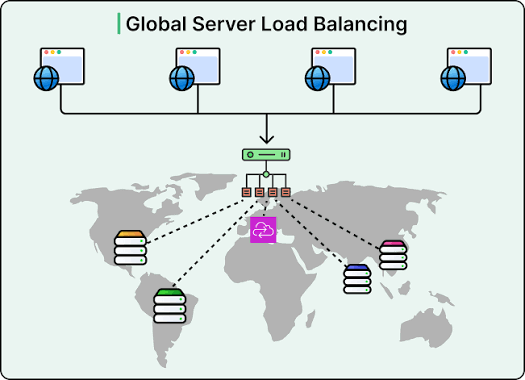
Page speed has a huge impact on the user experience. If a page takes a long time to load, the user is far more likely to just walk away before the content has even loaded. A primary cause of this delay is distance. If your server is in one part of the world and your user is on the other side of the world, then every single file is going to take longer to get to them. A CDN solves this problem by having copies of your static assets stored much closer to the end user. This article looks at how CDNs work, how they can improve load times and how you can actually use them in your own projects.
What a CDN Is and How It Works
A CDN is a group of servers located in a number of different geographic locations. Those locations are known as Points of Presence (PoPs) and the servers within them are typically known as edge servers. The major providers are Cloudflare, Amazon CloudFront, Akamai and Fastly.
The Origin and the Edge
Your site still has a main server (the origin). The CDN sits in between the origin and the user. When a user requests a file, that request is sent to the nearest edge server rather than the origin.
Cache Hits and Cache Misses
If the edge server already has the file it just returns it straight away. That’s a cache hit. If it doesn’t have it then it will fetch the file from the origin, send it to the user and store a copy for future requests. That’s a cache miss. Over time of course the majority of requests for popular assets will be cache hits.
What Counts as a Static Asset
Static assets are files that are the same for every user. Typical examples would be images, CSS stylesheets, Script bundles, fonts and downloadable documents. These are the ideal candidates for caching as they don’t change all that often.
How CDNs Reduce Page Load Times
Shorter Distance, Lower Latency
Data travels faster over shorter distances. Serving the files from a local edge server reduces the round trip time for each request and that makes a difference as a single page can contain dozens of files.
Less Load on the Origin
When the CDN is handling the vast majority of asset requests the origin server is then free to do the dynamic work (database queries, API calls etc) and the app remains responsive during a spike in traffic.
Built-In Optimizations
The vast majority of CDNs support modern protocols (HTTP/2 and HTTP/3) and will compress text files using either gzip or Brotli. Many will also offload the TLS handshake to the edge. A number of providers will go further and provide image resizing and format conversion as part of their offering, which in turn will lead to smaller file sizes.
Setting Up a CDN for Static Assets
Step 1: Choose Where Assets Live
Assets can remain on your application server or be moved over to object storage (e.g. Amazon S3). The CDN then uses that as its origin.
Step 2: Configure Caching Rules
Caching is predominantly controlled via the Cache-Control HTTP header. A value of max-age=31536000 for example would instruct browsers and CDNs to cache a file for one year. For files that are going to be changing all the time you’ll want to use a much shorter value.
Step 3: Use Versioned File Names
Long cache times are a problem in that you can end up with stale files after a release. The standard way of dealing with this is to append a content hash to the filename (e.g. app.3f9a1c.js). If the file changes then the filename changes and the CDN will pick up the new version. This is the default behaviour of build tools such as Vite and webpack.
Step 4: Point Your Domain to the CDN
The vast majority of the time you’ll see a DNS record (typically a CNAME) that points a subdomain like static.example.com at the CDN.
Why CDN Knowledge Matters for Developers
Full stack developers work across the front end, the back end and the deployment layer so performance is something they’re going to be concerned with. In Spring Boot static resources in the /static folder can be served with cache headers and content based versioning can be turned on via the property spring.web.resources.chain.strategy.content.enabled. Knowing how that interacts with a CDN is going to help you avoid having stale files and slow pages.
When looking at a full stack developer course make sure it has some practical lessons around caching, cloud hosting and web performance as those are the skills you’d expect to see in a production environment.
Conclusion
A CDN reduces page load times by serving the static assets from a server that’s geographically closer to the user. It reduces latency, reduces the load on the origin and can provide a range of useful optimisations such as compression and modern protocols. You can get all of that with a good CDN in place, using sensible caching rules and versioned file names so you don’t end up serving stale content. A good full stack developer course will typically cover the deployment aspects as well as Spring Boot, REST APIs and the various frontend frameworks. For anyone actually building web apps, knowing how to set up a CDN is a very sensible thing to learn.