


Key Takeaways
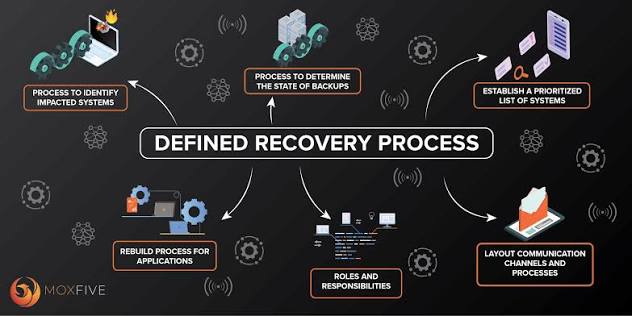
- Recovery planning should cover data, systems, applications, people, and business processes.
- Backups need separation, limited access, retention settings, and routine restore testing.
- Recovery Time Objectives and Recovery Point Objectives turn broad expectations into measurable targets.
- Ransomware recovery requires isolation and validation, not only file restoration.
- Small, frequent tests can expose missing dependencies before a real incident.
- Named roles, current contacts, and alternate communications make the plan easier to use under pressure.
Ransomware recovery is not simply a matter of keeping a copy of important files. A workable plan helps an organization restore the systems, access, applications, and data that employees and customers need to continue operating. Protected copies, such as immutable backup snapshots, can be part of that strategy, but they must be paired with clear ownership, recovery priorities, and regular validation.
A strong data recovery plan also prepares teams for problems beyond ransomware, including hardware failures, cloud service disruptions, accidental deletion, software errors, and damaged configurations. The goal is to reduce uncertainty during a stressful event by deciding in advance what must be restored, who makes decisions, and how recovery will be performed safely.
Why Data Recovery Planning Matters
Having backups does not automatically mean an organization can recover. A copy may be incomplete, too old, inaccessible, encrypted by an attacker, or missing the configuration and credentials needed to restore an application. The ransomware guide emphasizes preparation, incident response, isolation, and recovery as interconnected activities rather than separate tasks.
Recovery plans work best when business and technical leaders agree on the order in which services return. IT and security teams may execute the restoration, while operations, finance, legal, communications, and executive leaders determine what levels of downtime and data loss are acceptable for each business function.
What a Data Recovery Plan Should Protect
Begin with an inventory before choosing backup schedules or tools. List the information and technology that support revenue, customer service, safety, compliance obligations, and internal operations. Include the owner of every critical asset and the people who can confirm that it is working after restoration.
Critical Data and Systems
- Customer records, contracts, financial data, payroll information, and operational documentation.
- Intellectual property, product designs, source code, and business records.
- Identity services, email, collaboration platforms, file shares, databases, and line-of-business applications.
- Virtual machines, cloud workloads, endpoints, network devices, security controls, and monitoring systems.
Hidden Dependencies
Each application should have a dependency checklist. A restored application may still fail if its database, authentication service, DNS record, encryption key, software license, network route, or configuration file has not been restored as well. Dependencies often determine the real recovery sequence.
Set Recovery Time and Data Loss Goals
Recovery objectives help teams make practical decisions before an incident. A Recovery Time Objective, or RTO, is the longest acceptable period that a service can remain unavailable. A Recovery Point Objective, or RPO, is the maximum acceptable amount of recent data that may be lost.
Do not apply one target to every system. For example, identity and communication services may need to return quickly because other restoration work depends on them. Archives and reference materials may have a longer acceptable recovery window. Document the priority order, the target RTO and RPO, and the business owner who approves each target.
Design a Backup Strategy With Multiple Layers
Layered backups give recovery teams options when a production environment cannot be trusted. Keep multiple copies of important data, use more than one storage location or media type, and maintain at least one copy that cannot be easily changed through normal production access. Retention periods should reflect business needs, contractual duties, and applicable legal requirements.
Consider the tradeoffs among full, incremental, and differential backups; application-aware backups; system images; file versioning; and cloud-to-cloud copies. These approaches can differ in storage use, backup duration, restore speed, and the level of flexibility available during recovery. Cover application data as well as configurations, infrastructure definitions, and critical cloud account settings.
Protect Backups From Attack and Mistakes
Backups deserve security controls that are at least as deliberate as those used for production systems. Use separate backup administration accounts, multifactor authentication, least-privilege permissions, encryption in transit and at rest, and delete protection or retention locks where appropriate. Review privileged access after staffing changes and major infrastructure updates.
Separate backup management from ordinary production access where possible, and monitor unusual login activity, mass deletion attempts, or unexpected changes to retention settings. Closely connected backup systems can inherit the same compromise that affects production.
Write Clear Ransomware Response Steps
- Confirm and contain: Review alerts, isolate affected devices or accounts, and limit further spread.
- Preserve evidence: Retain relevant logs, alerts, system details, and ransom notes for investigation.
- Activate the response team: Notify technical, leadership, legal, insurance, and communications contacts.
- Find clean recovery points: Review the incident timeline before selecting backups to restore.
- Restore in a controlled environment: Recover priority services on clean or isolated infrastructure.
- Verify before reconnecting: Check accounts, applications, data, logs, and security tooling.
- Monitor and improve: Watch for signs of persistence, then document any gaps and the corrective actions taken.
Test the Plan Before a Crisis
A plan is useful only if people can follow it when time is limited. Run tabletop exercises to practice decisions and communication. Perform file restore tests to confirm that selected data opens correctly. Schedule application restore tests to validate dependencies, and periodically conduct system rebuild or full recovery exercises in an isolated environment.
Test again after cloud migrations, acquisitions, major software upgrades, backup-policy changes, or significant architecture changes. Record the steps that caused delays, including missing passwords, incomplete documentation, unavailable licenses, unclear ownership, or inaccurate contact lists.
Measure Recovery Readiness
Use a short readiness report to show leadership whether recovery capability is improving. Useful measures include the percentage of critical systems with tested backups, restore-test success rates, time required to restore priority services, age of the oldest verified recovery point, backup failures found during review, and unresolved issues from prior exercises.
Keep reporting focused on business risk. State which services cannot yet meet their agreed recovery targets, what is causing the gap, who owns the remediation work, and when the next validation will occur.
Common Questions About Data Recovery Plans
How Often Should a Recovery Plan Be Tested?
Test core recovery procedures at least annually, and perform smaller restore checks more frequently. Systems with short recovery requirements or high business impact may warrant quarterly or monthly validation.
Is Cloud Backup Enough for Ransomware Recovery?
Cloud backup can be valuable, but reliability depends on account separation, access controls, retention settings, restore capacity, and testing. A cloud copy that an attacker can alter or delete is not a dependable recovery option.
What Should a Small Business Restore First?
Start with identity access, communication tools, customer-facing services, financial processes, and systems directly tied to revenue, safety, or essential operations.
Who Owns the Recovery Plan?
Ownership should be shared. Technical teams manage restoration procedures, while business leaders set priorities and approve acceptable downtime and data-loss targets.
Conclusion
A ransomware-ready recovery plan is clear, realistic, and regularly tested. By protecting backup copies, documenting dependencies, setting recovery targets, limiting administrative access, and rehearsing restoration steps, organizations can reduce confusion and improve their ability to restore important services after a disruptive event.