



How to connect Salesforce to finance, marketing, analytics and support — and the three decisions that separate integrations that hold up from the ones that quietly become a maintenance burden.
A CRM that doesn’t talk to anything is just an expensive address book.
That’s the uncomfortable truth behind a lot of underwhelming Salesforce rollouts. The platform gets stood up, the licenses get paid for, the sales team starts entering data — and then it sits there, an island. The finance system doesn’t know what sales closed. The marketing platform can’t see which leads converted. The support desk works from a different version of the customer than the account team does. Everyone’s busy re-keying data between systems that should have been talking to each other from day one.
Integration is what turns Salesforce from a place where sales types things into the connective tissue of the whole business. It’s also where a surprising amount of implementation effort quietly goes wrong. Here’s what actually matters when you connect your CRM to the rest of your stack.
What you’re usually connecting, and why it’s hard
ERP, marketing, the data warehouse and support — and the trap hiding inside each one
Most Salesforce integrations come down to a few recurring connections, and each has its own trap.
The link to your ERP or finance system is the one everyone wants, because it closes the loop between a closed deal and the money. It’s also the one where data-model mismatches bite hardest — the way finance defines an “account” is rarely the way sales does, and reconciling those definitions is most of the work.
The marketing platform connection matters because a lead’s journey doesn’t start in Salesforce; it starts in campaigns, forms, and email. Wiring that history in is what lets you actually see which marketing produced revenue, rather than guessing.
The link to a data warehouse or BI layer is what turns scattered CRM records into analysis you can act on. And increasingly, connections to support systems and customer portals matter, because the customer experiences your company as one entity even when your systems don’t.
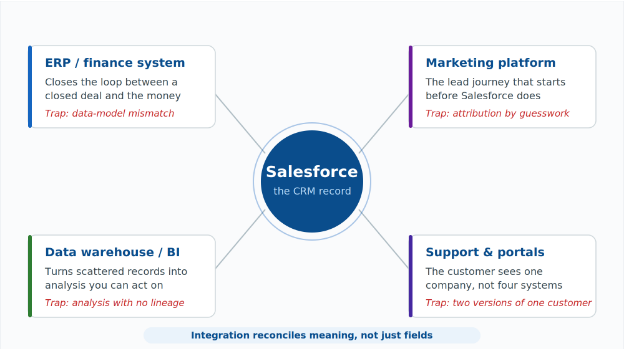
THE FOUR CONNECTIONS THAT CARRY THE LOAD
The recurring Salesforce connections, and the specific failure each one invites.
The common thread: integration is rarely about moving fields between two boxes. It’s about reconciling how different systems understand the same business reality.
Native, middleware, or custom
Three approaches, in ascending order of flexibility, cost and maintenance
There’s no single right way to connect Salesforce, and choosing badly is expensive to undo.
Native connectors and packaged app integrations are the fastest path when they fit. If a well-supported connector already exists for the system you’re joining, use it — you get maintained, upgrade-safe integration without building anything. The limit is flexibility: native connectors do what they do, and not much more.
Integration middleware — an integration platform sitting between your systems — is the workhorse for anything with real complexity. When you’re connecting several systems, transforming data as it moves, and handling failures gracefully, middleware gives you one place to manage all of it rather than a tangle of point-to-point links. It costs more up front and pays off as the number of connections grows.
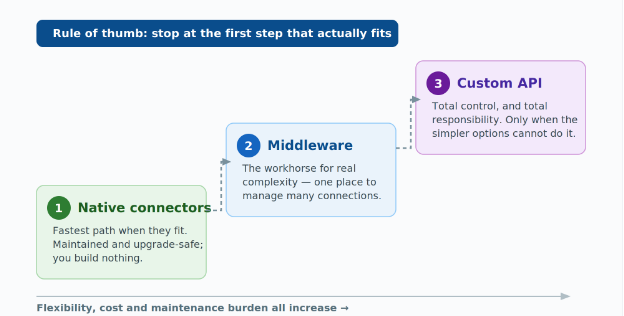
THE INTEGRATION LADDER
Each rung buys more flexibility and costs more to own. Stop at the first one that fits.
Custom API integration is the most flexible and the most demanding. When your needs are genuinely unique, building directly against Salesforce’s APIs gives you total control — and total responsibility for maintaining it as both systems evolve. Reach for it when the simpler options genuinely can’t do the job, not because it feels more powerful. The right approach here often looks a lot like general data integration services: the CRM is just one more system that has to share a single, consistent view of the customer.
At a glance: choosing between the three
| APPROACH | REACH FOR IT WHEN | THE TRADE-OFF |
|---|---|---|
| Native connectors | A well-supported connector already exists for the system you are joining | Limited flexibility — they do what they do, and not much more |
| Integration middleware | Several systems, data transformed in flight, failures handled gracefully | Costs more up front; pays off as connection count grows |
| Custom API integration | Needs are genuinely unique and the simpler options cannot do the job | Total control paired with total maintenance responsibility |
The details that decide success
Source of truth, failure handling, and the limits Salesforce enforces on you
A few things separate integrations that hold up from ones that turn into a maintenance burden.
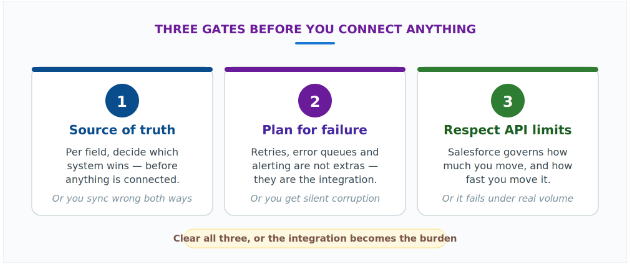
Decide your source of truth for every shared field before you connect anything. When two systems disagree about a customer’s address, which one wins? If you can’t answer that per field, your integration will happily sync the wrong value in both directions.
Plan for failure, because integrations fail — a system is down, an API times out, a record is malformed. What happens then decides whether you get a brief hiccup or silent data corruption. Retries, error queues, and alerting aren’t optional extras; they’re the integration.
And respect the API limits. Salesforce governs how much you can move and how fast, and an integration that ignores those limits works fine in testing and falls over under real volume.
THREE GATES BEFORE YOU CONNECT ANYTHING
Clear all three and integration becomes invisible. Skip one and it becomes the maintenance burden.
Conclusion
The whole argument, compressed
Salesforce delivers its real value only when it’s connected — to finance, to marketing, to your data platform, to support. Pick the lightest integration approach that actually fits (native before middleware, middleware before custom), decide the source of truth for every shared field, and build for failure from the start.
Done well, integration is invisible: the customer is the same customer everywhere, and nobody re-keys anything. Done badly, or skipped, you’ve bought an expensive island. Good Salesforce integration services are what turn the platform from a place data goes to die into the system the rest of the business runs on.
| KEY TAKEAWAYS | |
| 1 | An unconnected CRM stays an island — value arrives only with the connections |
| 2 | Work down the ladder: native first, middleware next, custom only when needed |
| 3 | Name the winning system for every shared field before a single record syncs |
| 4 | Retries, error queues and alerting are the integration, not extras bolted on later |
Frequently asked questions
Structured for FAQ schema markup and featured-snippet capture.
What is Salesforce integration?
Salesforce integration is the work of connecting the CRM to the other systems that hold customer and revenue data — ERP or finance, the marketing platform, a data warehouse or BI layer, and support systems or customer portals — so the same version of the customer exists in every one of them instead of being re-keyed between them.
Should I use a native connector, middleware, or a custom API integration?
Work down that list in order. Use a native or packaged connector when a well-supported one already exists for the system you are joining. Move up to integration middleware when you are connecting several systems, transforming data as it moves, or need failures handled gracefully. Build directly against the Salesforce APIs only when the simpler options genuinely cannot do the job.
What does “source of truth” mean in a Salesforce integration?
It is the system that wins when two platforms disagree about the same field — a customer address, an account name, a contract value. The decision has to be made field by field before anything is connected, because a sync with no answer to that question will propagate the wrong value in both directions rather than catching it.
What should happen when a Salesforce integration fails?
Integrations fail routinely: a system goes down, an API times out, a record arrives malformed. What the design does at that moment decides whether the result is a brief hiccup or silent data corruption, which is why retries, error queues and alerting belong in the build from the start rather than being added after go-live.
Do Salesforce API limits change how an integration should be built?
Yes. Salesforce governs both how much data you can move and how fast you can move it. An integration that ignores those limits will typically pass testing comfortably and then fall over under real production volume, so the limits should shape batch sizes, sync frequency and overall design from the beginning.
| BEFORE YOU CONNECT ANYTHING
Take one shared field — customer address, account name, contract value — and try to name the system that wins when the two disagree. If that answer is not already written down somewhere, that is the first piece of work. It is not a connector |